
 My Inquiry
 My Account


Conditional Access Module: CAM, CI/CI+ and DVB Security
Article Details
A conditional access module, or CAM, is a removable electronic module used in digital television and set-top box systems to manage access to encrypted broadcast services. It is normally inserted into a CI or CI+ slot on a host device such as a television receiver or set-top box. In many pay-TV systems, a smart card is inserted into the CAM to provide subscriber authorization.
A CAM is not a memory card, tuner, HDMI device or general-purpose decoder. It is part of the conditional access path. The host receives the broadcast stream, the CAM checks whether the subscriber is authorized, and protected content is processed according to the operator's access-control system. In CI+ systems, additional authentication and content-protection steps are used between the CAM and the host.
What Is a Conditional Access Module?
A conditional access module is a small hardware module that allows a host device to work with an encrypted broadcast service. The host may be a digital TV, satellite receiver, cable receiver or set-top box. The CAM is inserted into the Common Interface slot and communicates with the host through a defined electrical and protocol interface.
The word "conditional" refers to controlled access. A subscriber is allowed to view a program only when the service provider, smart card and module confirm the required rights. In a typical DVB system, the broadcast content is scrambled before transmission. The CAM helps the receiver determine whether the program can be descrambled for the subscriber.
The DVB CI and CI+ specifications describe a system in which a removable Conditional Access Module, when given the appropriate rights, can unscramble protected content and route it back to the host over the interface. CI+ adds stronger host-module security features compared with the earlier Common Interface model.
| Term | Meaning | Practical Role |
|---|---|---|
| CAM | Conditional Access Module | Removable module used to process access rights for encrypted broadcast content. |
| CI | Common Interface | Interface between the host receiver and the CAM. |
| CI+ | CI Plus | Enhanced CI system with additional authentication and link-protection functions. |
| Smart card | Subscriber authorization card | Stores or provides access credentials used by the conditional access system. |
| Host | TV or set-top box | Receives the broadcast stream, communicates with the CAM and displays authorized content. |
CAM, CI and CI+: Basic Relationship
CAM, CI and CI+ are related but not identical. The CAM is the physical module. CI is the host interface used by the module. CI+ is a later extension that adds additional security, including mutual authentication between the host and the CAM and protection of the content link back to the host.
In consumer use, these terms are often mixed. A user may call the entire assembly a "CAM card," even when the actual system includes a CAM module and a separate smart card. In engineering and sourcing work, the distinction matters because the module, card, connector and host slot are different parts of the system.
| Item | Hardware Form | Compatibility Check |
|---|---|---|
| CAM module | Removable module inserted into the host CI/CI+ slot. | CI or CI+ version, host firmware, operator compatibility and regional service rules. |
| Smart card | Small authorization card inserted into the CAM. | Operator activation, card orientation, contact condition and pairing rules. |
| CI/CI+ slot | Connector and mechanical bay in the TV or receiver. | Mechanical fit, insertion direction, contact reliability, ESD and supported CI+ version. |
| Host receiver | TV, set-top box or digital receiver. | Tuner support, service region, firmware version, CAM menu support and content-protection rules. |
CI Plus and Conditional Access Module Video
The video above from DVB Project gives a technical overview of the CI Plus ecosystem, including DVB-CI, Conditional Access Module behavior, CI Plus updates, USB form factor development, testing and deployment. It is a useful reference after reviewing the basic relationship between CAM, CI, CI+ and host receivers.
How a Conditional Access Module Works
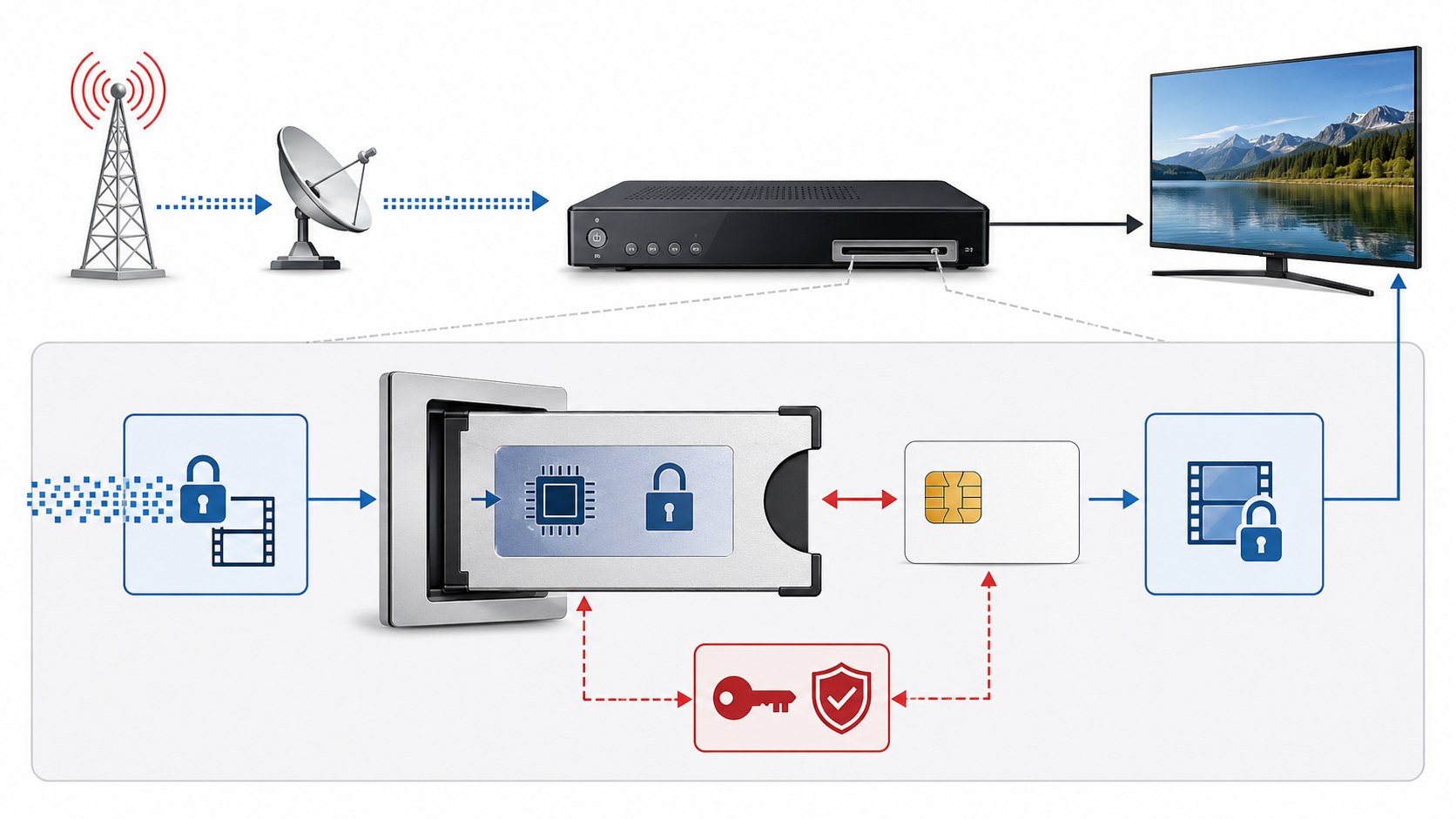
A conditional access module sits between the encrypted broadcast stream and the host receiver's access-control process. The exact implementation depends on the operator, conditional access system and CI/CI+ version, but the basic workflow is similar across many digital TV systems.
- The broadcaster sends encrypted or scrambled digital content.
- The TV or set-top box receives the transport stream through satellite, cable or terrestrial broadcast input.
- The host sends the relevant conditional-access information to the CAM through the CI/CI+ interface.
- The CAM works with the smart card or authorization data to check whether the subscriber has the right to access the program.
- If authorized, the protected content is processed according to the access system and returned to the host.
- The host continues video and audio decoding for display.
Conditional Access Module Card vs Smart Card
"Conditional access module card" is a common phrase, but it can mean two different things. The CAM is the larger module inserted into the CI or CI+ slot. The smart card is the smaller subscriber card inserted into the CAM. The smart card normally comes from the TV service provider and is linked to an active subscription or authorization system.
Some TVs and receivers also support operator-specific configurations where the CAM and card must be paired, activated or recognized by the service provider. This is why a CAM that physically fits into the slot may still fail to decode content if the card, operator profile, CI+ version, region or subscription status is not compatible.
| Common User Phrase | More Accurate Meaning | Technical Note |
|---|---|---|
| CAM card | Often means CAM module plus smart card. | The module and card are separate parts in many systems. |
| CI card | Usually means a CAM used in a CI/CI+ slot. | CI is the interface, not the card itself. |
| Smart card | Subscriber authorization card. | Should be inserted into the CAM, not directly into the TV slot unless the host specifically supports that structure. |
| CI+ module | CAM module designed for CI+ host systems. | Compatibility depends on module version, host support and operator rules. |
CI+ Module for TV: What Engineers Should Know
In many TVs, the CI+ slot appears as a narrow side or rear opening with a card-module connector. Sony support material describes the CI+ module as a Conditional Access Module provided by a digital TV operator together with an accompanying smart card for premium programs. In a product or repair context, this means the hardware slot, module, smart card, service region and host software must all work together.
From an electronics design view, the CI/CI+ interface is not only a mechanical slot. It includes connector durability, card insertion alignment, hot-plug behavior, ESD exposure, power budget, firmware recognition, security authentication and shielding. A weak connector, noisy supply rail or incomplete software support can cause module detection errors even when the CAM is valid.
| Design Area | Why It Matters |
|---|---|
| Mechanical slot | Controls insertion direction, module retention, tolerance stack-up and user handling. |
| Connector contacts | Contact wear, oxidation or poor alignment can cause module detection failure. |
| Power supply | The host must provide stable power to the CAM under module load and hot-insertion conditions. |
| ESD protection | The slot is user-accessible and may be exposed to electrostatic discharge during insertion. |
| Firmware support | The host must recognize the CAM, display the CAM menu and handle CI/CI+ communication correctly. |
| Regional service support | A valid CAM may still be unsupported if the host, operator or broadcast region is incompatible. |
Key ICs and Components Inside a CAM
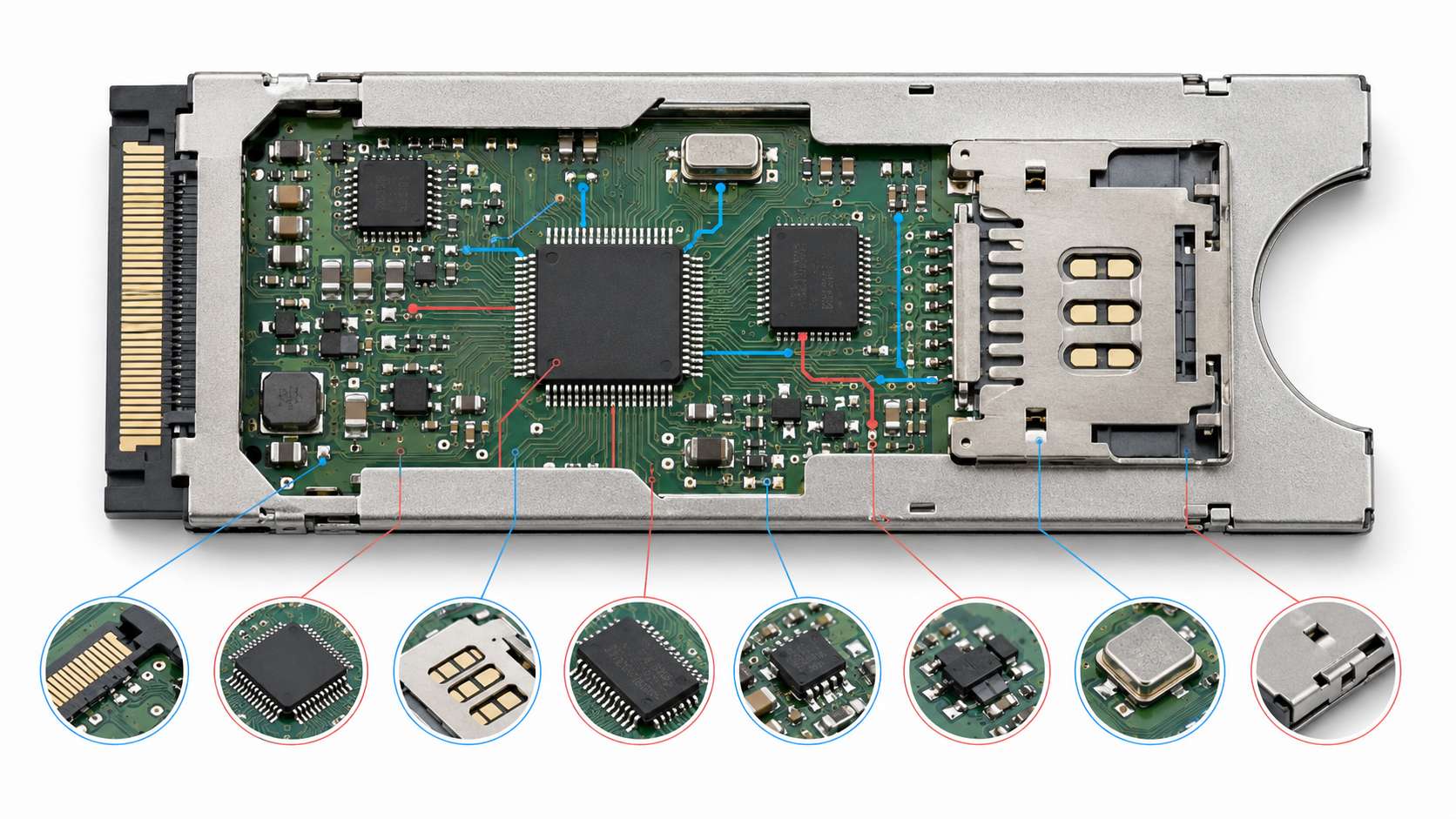
A conditional access module is a compact embedded system. The exact design is proprietary and depends on the security platform, operator and manufacturer, but a typical CAM may include secure processing, memory, power management, smart-card interface circuitry, ESD protection, clock components and a high-reliability connector system.
These components are selected for security, size, power consumption, interface stability and long-term availability. A CAM may sit inside a television for long periods, operate in a warm enclosure and be handled directly by users. That makes power integrity, contact reliability and ESD protection important even though the module is small.
| Component | Role in a CAM | Selection Focus |
|---|---|---|
| Secure microcontroller or security processor | Runs conditional access logic, authentication and module control functions. | Security features, lifecycle support, memory resources, firmware model and certification needs. |
| Smart card interface IC | Provides electrical interface between the CAM and subscriber smart card. | Voltage class, ESD, clock support, reset control and card-detection behavior. |
| Non-volatile memory | Stores firmware, configuration or module data. | Endurance, retention, secure access, package and supply voltage. |
| Power management IC | Generates local rails for the module electronics. | Low noise, efficiency, standby current, thermal behavior and protection features. |
| ESD protection device | Protects user-accessible pins, smart-card contacts and interface lines. | Low capacitance, clamping behavior, package size and IEC-level protection target. |
| Clock source | Provides timing reference for processor, interface or card communication. | Frequency accuracy, startup time, load capacitance, package and temperature range. |
| Connector and shielding | Provides host interface, smart-card contact and mechanical protection. | Contact resistance, insertion cycles, plating, EMI shielding and dimensional tolerance. |
Conditional Access Module vs Set-Top Box
A CAM and a set-top box are not the same product. A CAM is an access module that depends on a host receiver. A set-top box is a complete receiver that usually includes tuner, demodulator, conditional access function, processor, memory, power supply and video output. A TV with a CI+ slot can use a CAM to access certain services without a separate external receiver, but compatibility depends on the TV, operator and module.
| Item | Conditional Access Module | Set-Top Box |
|---|---|---|
| Main function | Handles conditional access for a compatible host. | Receives, processes and outputs TV services as a standalone device. |
| Host dependency | Requires a TV or receiver with CI/CI+ slot. | Operates as its own receiver platform. |
| Interface | CI or CI+ slot. | RF, HDMI, Ethernet, USB, smart card slot or operator-specific interfaces. |
| Upgrade path | Depends on module firmware and host firmware compatibility. | Depends on set-top box hardware, software and operator support. |
| Typical advantage | Cleaner installation when the TV supports the service directly. | More complete control over tuner, middleware, applications and operator features. |
Conditional Access Module vs CableCARD
Conditional access module and CableCARD are related concepts, but they belong to different technical and regional ecosystems. CAM and CI/CI+ are most commonly discussed in DVB-based television systems. CableCARD is associated with North American cable TV access systems. Both deal with subscriber authorization, but their interface, host requirements, operator rules and market use are different.
| Comparison | CAM / CI / CI+ | CableCARD |
|---|---|---|
| Common market | DVB-based cable, satellite and terrestrial TV environments. | North American cable TV environment. |
| Host device | TV or set-top box with CI/CI+ support. | CableCARD-compatible host or receiver. |
| Security model | Operator CA system plus CI/CI+ interface protection where supported. | Cable operator authorization and CableCARD host rules. |
| Replacement rule | Check CI/CI+ version, operator support, region and host firmware. | Check cable operator support and host compatibility. |
Design and Reliability Checks for CAM Systems
A CAM-related product design should be reviewed as a user-accessible interface, security boundary and embedded electronics subsystem. The module must be recognized reliably, powered correctly and protected from handling stress. The host must also support the operator's module type and software requirements.
| Check Item | Design Question |
|---|---|
| CI/CI+ version | Does the host support the module and operator requirement? |
| Connector durability | Can the slot survive the expected insertion cycles and user handling? |
| Power budget | Can the host supply the CAM during startup, authentication and normal operation? |
| Hot insertion | Are power sequencing, detection and firmware recovery handled correctly? |
| ESD protection | Are exposed contacts and interface lines protected against user handling? |
| EMI and shielding | Does the module enclosure and host slot control interference and emissions? |
| Thermal behavior | Can the module operate inside a warm TV or set-top box enclosure? |
| Firmware compatibility | Can the host detect the module, open the CAM menu and recover from communication errors? |
| Smart-card contact reliability | Are card contacts protected against wear, contamination and incomplete insertion? |
| Operator approval | Is the module approved or supplied for the service provider and region? |
Security and Compliance Notes
Conditional access modules exist to enforce authorized access to broadcast services. CI+ was developed to strengthen the interface between the module and the host by adding common authentication and link-protection methods. In real systems, service access also depends on operator authorization, module profile, smart card activation, regional service policy and the host's firmware support.
A CAM should not be treated as a generic adapter that works with every encrypted channel. Physical fit does not guarantee service access. A module may fit into a CI+ slot but still fail if it is not approved by the operator, not activated, mismatched with the smart card, unsupported by the host, or blocked by regional service rules.
Common CAM Failure Symptoms
CAM problems can come from hardware, firmware, authorization or service compatibility. A missing-module message may be caused by the host slot, CAM contacts, insertion direction, firmware support or the module itself. An authorization error may be caused by subscription status, smart-card pairing, operator activation or regional mismatch.
| Symptom | Likely Area to Check | Engineering / Service Note |
|---|---|---|
| TV does not detect CAM | Slot contact, insertion direction, host firmware, module damage or power rail issue. | Check mechanical fit, connector pins, CAM menu detection and host support. |
| CAM detected but channel locked | Smart card, subscription, pairing, entitlement or operator authorization. | Physical detection is separate from content authorization. |
| Intermittent access | Contact wear, thermal issue, firmware error or weak power stability. | Check slot retention, module temperature and host software updates. |
| CI+ incompatibility message | Version mismatch, operator profile or host compatibility. | CI+ support depends on both the CAM and the host receiver. |
| Smart card not recognized | Card orientation, contact contamination, activation status or card-module pairing. | Check operator instructions and card contact condition. |
How to Select a Conditional Access Module
CAM selection starts with the service provider, not with the module package. The module must support the operator's conditional access system, the host's CI/CI+ interface and the subscriber authorization method. A CAM sold for one market or operator may not work in another market even if the physical connector looks the same.
| Selection Item | What to Check |
|---|---|
| Service provider support | Confirm that the CAM is approved or supplied for the specific TV service. |
| CI or CI+ version | Check host support and module requirement. |
| Smart card compatibility | Confirm card type, activation method, orientation and pairing rules. |
| Broadcast type | Check DVB-C, DVB-S/S2, DVB-T/T2 or operator-specific requirements. |
| Host firmware | Update or verify firmware support where the manufacturer recommends it. |
| Mechanical fit | Check slot position, insertion direction, clearance and retention. |
| Thermal and reliability limits | Check module behavior in the final enclosure and operating environment. |
Frequently Asked Questions
What is a conditional access module?
A conditional access module is a removable electronic module used with a compatible TV or set-top box to manage access to encrypted digital broadcast services.
What does CAM mean in TV?
CAM means Conditional Access Module. In TV systems, it is usually inserted into a CI or CI+ slot and works with a smart card or operator authorization to access subscribed channels.
What is a CI+ module?
A CI+ module is a Conditional Access Module designed for the CI Plus interface. CI+ adds authentication and content-link protection features between the CAM and the host device.
Is a CAM the same as a smart card?
No. The CAM is the module inserted into the TV or receiver. The smart card is usually inserted into the CAM and carries subscriber authorization information.
Do all TVs support CAM modules?
No. A TV needs a compatible CI or CI+ slot, firmware support and operator compatibility. A CAM that works in one TV or region may not work in another.
Can a CAM work without a smart card?
Some systems may use operator-specific authorization methods, but many traditional CAM systems require a smart card issued by the service provider.
What is the difference between CAM and set-top box?
A CAM depends on a host TV or receiver. A set-top box is a complete receiver platform with tuner, processing, software, output interfaces and access-control functions.
What is the difference between CAM and CableCARD?
CAM and CI/CI+ are commonly associated with DVB-based systems. CableCARD is associated with North American cable TV systems. They serve similar access-control purposes but use different standards and markets.
Why is my TV not detecting the CAM?
Possible causes include wrong insertion direction, dirty or damaged contacts, incompatible CI/CI+ version, unsupported host firmware, power issue or faulty module.
Why is the CAM detected but channels are still locked?
The module may be physically detected while the smart card or subscription is not authorized. Check operator activation, card pairing, service region and subscription status.
Can a conditional access module be hacked?
This article does not provide hacking or bypass methods. CAM systems are intended for authorized access through the service provider, compatible module and valid subscription.
What components are used inside a CAM?
A CAM may include a secure processor, smart-card interface circuit, memory, power management IC, ESD protection, clock source, connector contacts and shielding.
Engineering Summary
A conditional access module is a removable access-control module used in digital TV and set-top box systems. It works with a host CI or CI+ interface and often with a smart card supplied by the service provider. Its job is to support authorized access to encrypted broadcast services, not to act as a universal decoder or memory card.
For engineering review, the main checks are CI/CI+ version, host firmware, operator approval, smart-card compatibility, connector reliability, power stability, ESD protection, EMI shielding, thermal behavior and user handling. For sourcing and repair, physical fit is not enough; the module, host, service provider and authorization system must all be compatible.


