
 My Inquiry
 My Account


Machine Vision System: Components, Inspection Applications and Integration Guide
Article Details
A machine vision system is an industrial imaging system that captures visual information, processes the image, and sends a decision or measurement result to automation equipment. It is used for inspection, measurement, positioning, identification, color sorting, robot guidance, and quality control in manufacturing environments.
A complete machine vision system usually combines an industrial camera, lens, lighting, image sensor, processor, trigger input, software algorithm, communication interface, and mechanical mounting. The system result depends on the complete optical and electrical chain, not only on the camera resolution.
Practical design starts by defining the inspection area, smallest detectable feature, required working distance, line speed, exposure time, lighting method, image bandwidth, and integration interface. These parameters determine whether a 2D camera, 3D sensor, smart camera, PC-based system, or robot-mounted vision system is suitable.
What Is a Machine Vision System?
A machine vision system is an automated visual inspection and decision system. It uses image capture hardware and software processing to detect object presence, measure dimensions, read codes, inspect defects, guide robots, classify products, or send pass/fail signals to a PLC, conveyor, robot controller, or factory information system.
| Item | Practical Meaning |
|---|---|
| Main function | Captures and analyzes images for inspection, measurement, identification, positioning, and automation control |
| Typical hardware | Camera, lens, lighting, trigger sensor, processor, I/O module, communication cable, mounting hardware |
| Typical software | Image processing, calibration, defect detection, pattern matching, barcode/OCR, measurement, AI model or rule-based inspection |
| Common output | Pass/fail signal, measurement value, robot coordinates, barcode data, defect classification, production record |
| Common industries | Electronics, automotive, semiconductor, packaging, food and beverage, pharmaceutical, logistics, robotics |
Machine Vision System Components
A machine vision system is built from optical, electronic, mechanical, and software elements. Cognex describes major machine vision components as lighting, lens, image sensor, vision processing, and communications. (Cognex, Introduction to Machine Vision)
| Component | Function | Design Consideration |
|---|---|---|
| Industrial camera | Captures the image of the part, code, surface, or assembly | Resolution, frame rate, shutter type, sensor size, interface, ruggedness |
| Lens | Defines field of view, magnification, working distance, and image sharpness | Focal length, aperture, distortion, depth of field, mount type |
| Lighting | Creates contrast between the feature and background | Angle, wavelength, brightness, strobe timing, reflection control |
| Image sensor | Converts light into pixel data | Pixel size, dynamic range, global/rolling shutter, noise, sensitivity |
| Processor | Runs inspection logic, image processing, AI inference, or measurement algorithms | CPU, GPU, FPGA, SoC, smart camera processor, latency |
| Trigger / encoder | Synchronizes image capture with product position or conveyor motion | Timing accuracy, trigger delay, encoder resolution, jitter |
| I/O and communication | Sends result data to PLC, robot, computer, or factory system | Ethernet, USB, GigE Vision, Camera Link, CoaXPress, discrete I/O, fieldbus |
| Software | Detects features, measures geometry, classifies defects, and outputs decisions | Rule-based tools, calibration, deep learning, model maintenance, false reject control |
How a Machine Vision System Works
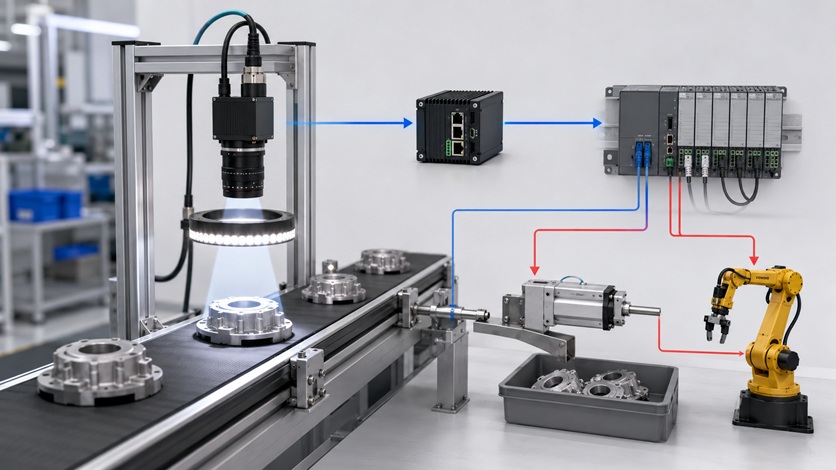
A machine vision inspection sequence begins before the camera captures an image. The part must be positioned, lit consistently, triggered at the correct time, captured without blur, processed within the cycle time, and reported to automation equipment in the required format.
- The object enters the inspection station on a conveyor, fixture, rotary table, robot station, or test jig.
- A photoelectric sensor, encoder, PLC output, or robot signal triggers image capture.
- LED lighting or strobed illumination creates contrast on the target feature.
- The camera and lens capture the inspection area with the required field of view.
- The software processes the image using thresholding, edge detection, pattern matching, measurement, code reading, or AI inspection.
- The system compares the result with tolerance, quality, or classification criteria.
- The output is sent to a PLC, robot controller, reject mechanism, database, or human-machine interface.
Machine Vision System Components Video
The video below gives a visual overview of core machine vision system components, including camera, optics, illumination, image acquisition, processing hardware, and software.
Camera, Lens and Field of View Selection
Field of view is the physical area that must be captured by the camera. It should include the full inspected part, expected part position variation, fixture tolerance, and enough margin for image processing. If the field of view is too small, parts may move outside the image. If it is too large, the smallest defect may occupy too few pixels.
Field of view and working distance are usually checked before selecting the lens. When sensor size, focal length, and working distance are known, the Field of View Calculator can estimate the captured object area and object-side pixel scale.
If the required inspection area is already defined, the Lens Focal Length Calculator can be used to estimate the focal length needed for the target field of view at a given working distance.
| Parameter | Why It Matters |
|---|---|
| Working distance | Defines the space between lens and object, affecting lens selection and mechanical mounting |
| Sensor size | Affects field of view for a given focal length and working distance |
| Focal length | Controls magnification and captured area |
| Lens distortion | Can affect dimensional measurement and edge position accuracy |
| Depth of field | Determines how much height variation remains in focus |
| Mount stability | Vibration or lens movement can shift calibration and inspection results |
Pixel Resolution and Defect Size
Pixel resolution links camera selection to inspection capability. A defect or feature must cover enough pixels to be detected reliably. One visible pixel is not usually enough for stable inspection; edge detection, measurement, OCR, barcode reading, and defect classification require practical pixel coverage and image contrast.
Resolution should be checked against the smallest defect or feature that must be detected. The Pixel Resolution Calculator helps estimate object-side pixel size and how many pixels cover a target feature.
| Inspection Requirement | Pixel Resolution Impact |
|---|---|
| Presence / absence check | Usually requires less resolution than dimensional measurement |
| Defect detection | Small defects require enough pixel coverage and contrast against the background |
| Dimensional inspection | Requires calibration, stable optics, and enough pixels per tolerance band |
| OCR / code reading | Requires readable character or module size, controlled lighting, and image sharpness |
| Robot guidance | Requires repeatable object location and calibrated coordinate mapping |
Exposure Time, Motion Blur and Strobe Lighting
In moving inspection systems, exposure time directly affects image sharpness. If a part moves during exposure, edges and defects smear across multiple pixels. Motion blur can cause false rejects, missed defects, wrong measurements, and unstable code reading.
For moving parts, exposure time must be short enough to keep motion blur within the allowed pixel limit. The Motion Blur Exposure Calculator can estimate the maximum exposure time from object speed, field of view, image pixels, and allowable blur.
Short exposure often requires strobed lighting. The LED Strobe Duty Cycle & Power Calculator is useful for checking duty cycle, peak power, average power, average current, and thermal margin before selecting LED drivers and illumination modules.
| Problem | Possible Cause | Engineering Check |
|---|---|---|
| Blurry image | Exposure time too long for part speed | Reduce exposure, increase light intensity, use strobe lighting |
| Dark image after reducing exposure | Insufficient illumination energy | Increase light output or use synchronized strobe |
| LED light overheats | Average power too high or duty cycle too high | Check peak current, pulse width, repetition rate, heat sinking |
| Inconsistent inspection | Lighting angle or intensity changes | Fix lighting geometry and isolate ambient light |
Camera Interface and Data Bandwidth
Image bandwidth becomes important when resolution, frame rate, bit depth, camera count, or inspection speed increases. A camera can capture high-quality images, but the data path must still move frames to the processor without dropping images or adding unacceptable latency.
Camera interface selection should be checked from image size, frame rate, bit depth, pixel packing, number of cameras, and protocol overhead. The Camera Bandwidth Calculator can estimate required throughput and compare interface requirements before hardware selection.
| Bandwidth Factor | Design Impact |
|---|---|
| Resolution | More pixels increase data per frame |
| Frame rate | Higher speed increases data throughput and processor load |
| Bit depth | Higher bit depth increases image data size |
| Number of cameras | Multi-camera systems multiply interface and processing requirements |
| Protocol overhead | Real throughput is lower than raw theoretical link rate |
| Processing latency | Pass/fail decision must arrive before reject, sorting, or robot action point |
2D vs 3D Machine Vision System
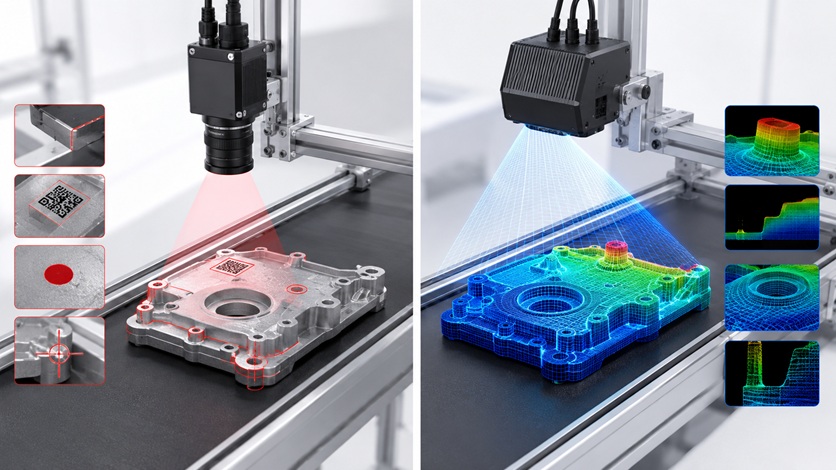
A 2D machine vision system analyzes a flat image. It is suitable for shape, edge, color, barcode, label, presence, orientation, and many surface inspection tasks. A 3D machine vision system measures depth, height, volume, profile, or surface geometry, making it useful for robot guidance, bin picking, volume measurement, shape defects, and height inspection.
| Type | What It Measures | Best For | Limitation |
|---|---|---|---|
| 2D machine vision | Edges, shape, position, color, contrast, printed codes | Label inspection, barcode reading, alignment, presence check, color sorting | Limited depth and height information |
| 3D machine vision | Height, depth, profile, volume, surface shape | Robot guidance, volume inspection, surface profile, bin picking, deformation detection | Higher cost, more complex calibration, surface-reflection sensitivity |
| Combined 2D + 3D system | Appearance and geometry together | Complex inspection where surface defects and height profile both matter | More integration work and higher processing load |
Machine Vision Inspection System for Automatic Inspection
Machine vision inspection systems are widely used when manual inspection is too slow, inconsistent, or difficult to scale. A well-designed system can inspect every part, store traceability data, reduce false accepts, and control downstream reject or sorting mechanisms.
| Inspection Task | Machine Vision Method | Typical Output |
|---|---|---|
| Defect detection | Surface contrast, texture analysis, edge detection, AI classification | Pass/fail, defect type, defect location |
| Dimensional inspection | Calibrated measurement of edges, holes, width, length, angle, or gap | Measurement value and tolerance result |
| Presence / absence detection | Checks whether parts, pins, labels, seals, or components are present | Missing/installed result |
| Color sorting | Color-space analysis and controlled illumination | Sorting class or reject decision |
| Barcode and OCR | Reads printed codes, serial numbers, dates, and characters | Decoded data and readability grade |
| Robot guidance | Finds part position, orientation, or 3D pose | Robot coordinates or alignment correction |
| Assembly verification | Checks orientation, count, insertion, solder area, or fastener presence | Assembly OK/NG result |
Industrial Applications of Machine Vision Systems
Industrial machine vision systems are used wherever visual inspection, measurement, positioning, or sorting must be repeated at production speed. The best system architecture depends on the part material, motion, environment, accuracy requirement, and data output.
| Industry | Machine Vision Use |
|---|---|
| Electronics manufacturing | PCB inspection, component presence, solder defect detection, connector alignment, label verification |
| Automotive | Part inspection, robot guidance, weld inspection, casting defects, assembly verification |
| Semiconductor | Wafer inspection, package inspection, lead inspection, marking verification, die alignment |
| Food and beverage | Color sorting, fill level, cap inspection, label inspection, package integrity |
| Pharmaceutical | Code reading, seal inspection, fill inspection, blister pack verification, contamination detection |
| Logistics | Barcode reading, parcel dimensioning, sorting, label verification, tracking |
| Robotics | Pick-and-place, bin picking, pose estimation, alignment, inspection after assembly |
Machine Vision System Integration
Machine vision system integration connects the imaging hardware with the production machine. The integration task includes mechanical mounting, lighting enclosure, trigger timing, camera calibration, image processing setup, PLC communication, robot coordinates, reject timing, and production data handling.
| Integration Area | What Must Be Checked |
|---|---|
| Mechanical mounting | Camera rigidity, vibration, working distance, focus stability, service access |
| Lighting enclosure | Ambient light isolation, angle stability, reflection control, heat management |
| Trigger timing | Sensor delay, encoder position, exposure window, strobe synchronization |
| PLC communication | Pass/fail output, fault signal, inspection complete signal, timing margin |
| Robot integration | Coordinate calibration, camera-to-robot transform, repeatability, hand-eye calibration |
| Factory data | Image storage, defect logging, traceability, MES or SCADA connection |
| Maintenance | Lens cleaning, lighting aging, calibration check, model update, spare parts |
Common Failure Cases and Troubleshooting
Machine vision failures often come from optics, lighting, motion, timing, calibration, data bandwidth, or mechanical instability rather than from the camera alone. A practical troubleshooting process should connect symptoms to measurable causes.
| Symptom | Possible Cause | Troubleshooting Method | Design Correction |
|---|---|---|---|
| False rejects increase | Lighting variation, threshold too tight, product variation, dirty lens | Compare failed images with accepted images and check lighting stability | Lock lighting geometry, adjust tolerance, clean optics, improve algorithm margin |
| Missed defects | Insufficient pixel coverage, low contrast, wrong lighting angle | Check defect size in pixels and inspect contrast under controlled lighting | Reduce FOV, increase resolution, change lens, adjust illumination |
| Blurry image | Motion blur, vibration, focus drift, exposure too long | Check exposure time, part speed, mount stability, and focus | Shorten exposure, add strobe, stiffen mount, refocus lens |
| Inconsistent measurement | Calibration shift, lens distortion, part height variation, poor fixture | Run calibration check and inspect part positioning repeatability | Improve fixture, recalibrate, use telecentric lens if needed |
| Image frames drop | Insufficient bandwidth, overloaded processor, cable issue | Check data rate, camera count, frame rate, and interface logs | Reduce frame rate, improve interface, use faster processing hardware |
| Poor 3D result | Reflective surface, wrong triangulation angle, low texture, calibration error | Review 3D point cloud quality and surface reflection behavior | Adjust lighting, angle, surface preparation, or 3D sensor method |
| Reject actuator fires late | PLC delay, communication latency, wrong encoder offset | Measure time from trigger to output and compare with conveyor position | Adjust timing offset, reduce processing delay, improve PLC output timing |
Recent Technology Directions in Machine Vision Systems
Machine vision systems are moving toward higher integration, faster processing, better lighting control, and more flexible algorithms. The practical direction is not only higher camera resolution, but better end-to-end inspection reliability.
| Technology Direction | Engineering Impact |
|---|---|
| Edge AI smart cameras | Moves inspection logic closer to the camera and reduces PC dependency |
| Deep learning defect detection | Improves inspection of variable textures, complex defects, and non-uniform surfaces |
| 3D vision and depth sensing | Adds height, volume, and surface profile information for robotics and geometry checks |
| Multispectral and hyperspectral imaging | Detects material or color differences not visible in normal RGB images |
| FPGA / GPU acceleration | Reduces latency for high-speed inspection and multi-camera processing |
| Industrial Ethernet and high-speed interfaces | Improves data transfer for high-resolution and high-frame-rate cameras |
| Improved LED strobe control | Supports shorter exposure, reduced blur, and controlled average power |
Electronics Behind a Machine Vision System
A machine vision system depends on electronic components beyond the camera body. The image sensor, power management, lighting driver, interface IC, memory, FPGA, processor, connector, cable, and protection circuit all affect reliability and image quality.
| Electronic Component | Role in Machine Vision System |
|---|---|
| CMOS image sensor | Converts light into pixel data for inspection |
| Image signal processor | Handles image correction, exposure control, color processing, or pre-processing |
| FPGA / SoC / GPU | Accelerates image processing, triggering, data handling, and AI inference |
| LED driver | Controls continuous or strobed lighting current |
| Power management IC | Provides stable rails for camera, processor, sensor, and lighting electronics |
| Interface IC | Supports Ethernet, USB, LVDS, MIPI, CoaXPress, or other camera links |
| Memory | Stores image frames, algorithm data, calibration, or AI model parameters |
| ESD / TVS protection | Protects camera cables, I/O ports, and communication interfaces |
| Connectors and cables | Carry power, image data, trigger, lighting control, and communication signals |
Frequently Asked Questions
What is a machine vision system?
A machine vision system is an automated imaging system that captures and analyzes images to inspect parts, measure dimensions, read codes, guide robots, sort products, or make pass/fail decisions.
What are the main components of a machine vision system?
Main components include an industrial camera, lens, lighting, image sensor, processor, trigger input, software, communication interface, mounting hardware, and output connection to PLC, robot, or factory system.
How does a machine vision inspection system work?
The system triggers image capture, illuminates the part, captures an image, processes the image, compares the result with inspection criteria, and sends an output decision to automation equipment.
What is the difference between 2D and 3D machine vision?
2D machine vision analyzes flat images for shape, color, position, code, and surface features. 3D machine vision measures height, depth, profile, volume, or part pose.
What are machine vision systems used for?
They are used for defect detection, dimensional inspection, color sorting, barcode and OCR reading, assembly verification, robot guidance, surface inspection, and production traceability.
What are the advantages of machine vision systems?
Advantages include repeatable inspection, high-speed operation, reduced manual inspection variation, 100% inspection coverage, traceability data, and integration with automation systems.
What causes false rejects in machine vision inspection?
False rejects can be caused by lighting variation, dirty optics, threshold settings, product variation, vibration, calibration drift, or image blur.
What does a machine vision system integrator do?
A system integrator designs and commissions the complete inspection station, including camera, lens, lighting, software, mechanical mounting, PLC communication, trigger timing, reject control, and data handling.
Is machine vision the same as computer vision?
They overlap but are not identical. Computer vision is a broader software and AI field. Machine vision usually refers to industrial imaging systems used for automation, inspection, measurement, sorting, and control.
What camera is used in machine vision systems?
Machine vision systems may use area-scan cameras, line-scan cameras, smart cameras, 3D cameras, high-speed cameras, or multispectral cameras depending on the inspection task.
Engineering Summary for Machine Vision System Design
A machine vision system should be selected from the inspection requirement, not from camera resolution alone. Field of view, lens focal length, pixel resolution, exposure time, lighting method, data bandwidth, trigger timing, and processing latency must be evaluated together.
Tool-based checks can reduce early design errors. Field of view, focal length, pixel coverage, motion blur, LED strobe duty cycle, and camera bandwidth should be estimated before hardware selection. Final performance still depends on real optical contrast, stable mechanics, controlled lighting, calibration, and production-line validation.


